How schools can use everyday technology to support every learner.
Creating an inclusive school environment isn’t about adding more layers; it’s about designing learning in a way that works for everyone from the start.
As a SENCO or member of SLT, you’re constantly balancing the needs of individual pupils with the reality of whole-school delivery. Technology can play a powerful role here, but only when it’s used intentionally. That’s where inclusion by design comes in.
Inclusion by design: essential for some, useful for all
Accessible technology isn’t just a SEND solution; it’s a whole-school strategy. When used effectively, features like:
- Text-to-speech
- Dictation
- Captions
- Visual adjustments
become:
- Essential for some learners
- Helpful for many
- Beneficial for everyone
This approach reduces the need for reactive, one-off solutions and instead builds accessibility into everyday teaching and learning.
Making the most of the technology you already have
Many schools already have access to powerful accessibility tools through platforms like Microsoft 365 and Google Workspace, but they’re often underused. These platforms include features that support a wide range of needs, including:
- Reading and comprehension support
- Writing and communication support
- Focus and attention
- Visual and sensory adjustments
- Hearing accessibility
By utilising these readily available tools, schools can:
- Adapt learning for a wide range of individual needs.
- Reduce reliance on additional software.
- Create a more consistent experience across classrooms.
Supporting both students and staff
Inclusive technology isn’t just about pupils, it also supports staff in delivering more flexible, responsive teaching. For example:
- Teachers can use dictation and captions to model inclusive practice.
- Staff can adapt resources quickly using built-in tools.
- Support staff can reinforce strategies consistently across lessons.
When accessibility is embedded into the tools everyone uses, it becomes part of the culture, not an add-on.
Turning tools into practice across your school
One of the biggest challenges isn’t access, it’s knowing:
- What tools are available
- What they help with
- How to use them confidently
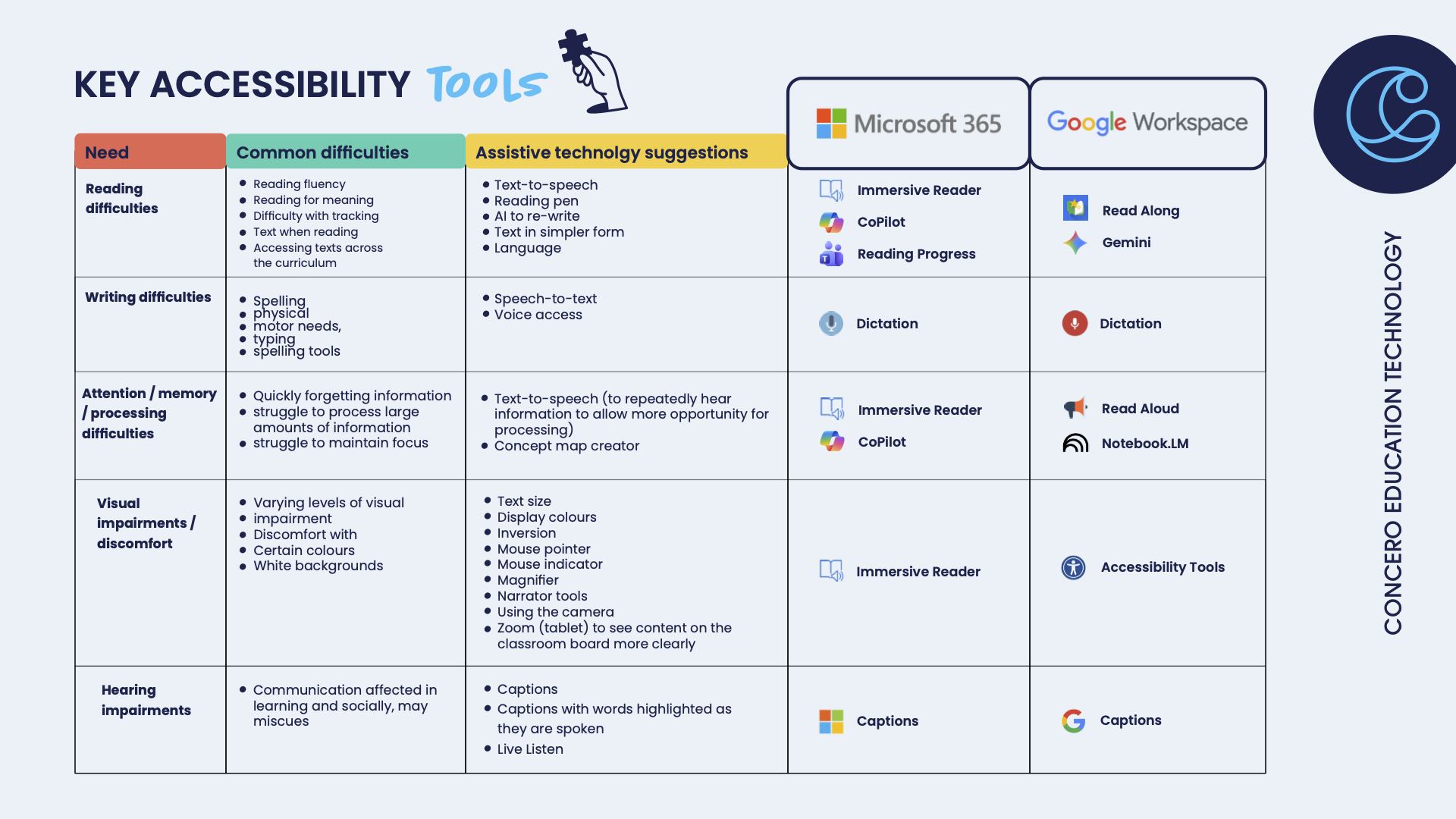
That’s why we’ve created a simple, shareable accessibility guide that maps:
- Common learning needs
- The tools that support them
- Where to find them in Microsoft 365 and Google Workspace
This guide can be shared across your school to align staff and support a consistent approach to inclusion.
ADD IN IMAGE
Download the accessibility guide and share it with your team
Use it in staff briefings, CPD sessions, or SEND reviews to support a more joined-up, inclusive approach across your school.
Building confidence and consistency
Having the tools is one thing; embedding them into everyday practice is another.
To truly support inclusive learning, staff need:
- Confidence in using the tools
- Clarity on when and why to use them
- Consistency across classrooms
Accessibility training to support inclusive practice
We offer practical accessibility training for schools, helping SENCOs, SLT, and teaching staff to:
- Adapt technology to support a wide range of individual needs.
- Use accessible features within Microsoft and Google platforms effectively.
- Improve engagement and productivity for both students and staff.
- Embed inclusive approaches into everyday teaching.
When accessibility is built into everyday practice, it creates a learning environment where everyone can take part, contribute, and succeed.