How schools can build accessible environments using the right mix of resources, confidence, and everyday technology
Inclusive Teaching Starts with the Right Support
Inclusive teaching starts with a shared responsibility – to create environments where everyone can access and engage, whether that’s in teaching, learning, or the wider school experience.
That means having a range of resources available and understanding how existing tools can be used more effectively.
Across schools, this is becoming an increasingly important focus. Around 1.7 million children in England have SEND—roughly one in five pupils¹.
At the same time, the direction from the DfE is clear. There is a growing move towards a more inclusive, “universal” approach—where support is embedded across the whole school, not just targeted at specific individuals².
Inclusive practice isn’t just about meeting identified needs; it’s about creating environments where everyone can participate fully.
Building Inclusive Classrooms and School Environments
Every school community is different. Pupils, staff, and leaders all bring a range of needs, preferences, and ways of working, and no single approach will work for all.
That’s why creating inclusive environments is about balance:
- Having the right resources available to support a range of needs
- Embedding inclusive practices into everyday teaching and school life
- Giving staff the confidence to adapt and respond in the moment
When this is in place, the impact goes beyond the classroom. It supports staff in their roles, strengthens communication, and helps create a more inclusive culture across the whole school.
Accessibility in Schools: Making Better Use of Existing Technology
At Concero, we work closely with schools every day, and one of the most common challenges we see isn’t a lack of technology; it’s a lack of time and confidence to fully explore what’s already there.
Across both Microsoft and Google environments, there are powerful accessibility features already built in – from dictation and screen readers to immersive reading tools and display adjustments.
But in many cases, these tools aren’t being used consistently. Not because they’re not valuable but because staff haven’t had the time or support to explore them fully.
This creates a gap between what’s available and what’s actually being used in practice.
Closing that gap doesn’t always require new systems. It often starts with awareness, confidence, and practical guidance.
Supporting Staff Confidence in Inclusive Teaching
For inclusive practice to be effective, it needs to be consistent across the whole school.
When staff feel confident using accessibility tools:
- Support becomes part of everyday practice, not something additional
- Pupils experience a more consistent approach across lessons
- Staff are better supported in their roles
- Schools are better equipped to meet SEND and accessibility expectations
In practice, this can be as simple as:
- A pupil using dictation to capture their ideas more easily
- A teacher enabling Immersive Reader to support comprehension
- Adjusting contrast or text size to reduce visual strain
These are small changes, but they can have a significant impact on how pupils access learning day to day.
This shift towards more inclusive, everyday practice is where schools can make the biggest impact, turning small changes into meaningful improvements for both pupils and staff.
A Practical Approach to Accessibility Training in Schools
Through our ongoing partnership with nasen, we’ve seen a growing demand from schools for practical, accessible training that fits into busy school environments³.
Schools aren’t looking for more complexity – they’re looking for simple, effective ways to support staff and improve inclusive practice.
Together with nasen, we’re supporting schools through focused accessibility training designed to help staff make better use of the tools already available to them.
In a one-hour session (delivered remotely or in person), staff explore:
- Built-in accessibility features across Microsoft and Google
- Practical ways to apply these in the classroom
- Approaches to supporting a wide range of learning needs
It’s designed to be simple, relevant, and immediately useful, supporting schools to take small, meaningful steps towards more inclusive practice.
👉 Find out more about the training here:
https://nasen.org.uk/news/turn-everyday-technology-inclusive-teaching
Moving Inclusive Practice Forward
The direction of travel is clear. Inclusive practice is no longer something separate – it’s becoming part of everyday teaching, learning, and the wider school environment.
Creating accessible spaces doesn’t happen through a single tool or initiative. It’s built over time, through the right combination of resources, greater awareness, and growing confidence across staff.
By supporting schools to better understand and use the tools they already have, alongside the wider resources available, meaningful progress can be made towards more inclusive environments for everyone.
Through our partnership with nasen, we’re continuing to support schools with practical, focused accessibility training, helping to turn everyday technology into something that works for every learner, in every setting.
👉 Find out more about the training here:
https://nasen.org.uk/news/turn-everyday-technology-inclusive-teaching
Sources
¹ Department for Education – Special Educational Needs in England
https://explore-education-statistics.service.gov.uk/find-statistics/special-educational-needs-in-england
² Department for Education – SEND and Alternative Provision Improvement Plan
https://www.gov.uk/government/publications/send-and-alternative-provision-improvement-plan
³ nasen – Resources and guidance on inclusive practice
https://nasen.org.uk/resources
It’s no secret that school days are busy. From lesson planning and marking to emails, reports and safeguarding admin, the workload builds quickly.
That’s where tools like Microsoft Copilot are starting to make a real difference.
Copilot works alongside the tools you already use, like Word, Outlook and Teams. It helps reduce time spent on repetitive tasks so you can focus on what matters most, teaching and leading.
For teachers, that might mean:
- Drafting lesson plans or adapting resources in seconds
- Creating quizzes or summaries from existing content
- Rewriting communications to parents clearly and quickly
For school leaders, it can support with:
- Writing policies, reports or inspection-ready documents
- Summarising long emails or meeting notes
- Turning ideas into structured plans faster
It’s not about replacing professional judgement. It’s about reducing pressure in the day-to-day.
Used properly, Copilot can help teams work more efficiently, communicate more clearly and free up valuable time across the school.
If you’re exploring AI in your setting, the key is keeping it practical, safe and aligned with how your school already works.
Because when the right tools are in place, everyday tasks become simpler. And that makes a real difference.
As expectations around DfE standards, cyber security, and digital learning in schools continue to grow, many leadership teams are re-evaluating how well their current IT infrastructure is really supporting them.
For Gorsemoor Primary School in Staffordshire, this meant taking a closer look at whether their technology was not only secure and compliant but also reliable, scalable, and capable of supporting accessible, inclusive learning across the school.
Rather than continuing with incremental changes, Gorsemoor decided to invest in a full IT transformation project, focused on modernising systems, strengthening security, and building a digital environment that could genuinely support both staff and pupils day to day.
Why IT Transformation Matters for Schools
Technology now underpins almost every aspect of school life from safeguarding and data protection to teaching, learning, and communication.
Yet in many schools, IT has evolved reactively over time. Systems are patched together, support is stretched, and reliability becomes inconsistent. While things may “work,” they don’t always work well enough to meet the growing demands placed on schools.
For senior leadership teams, this creates real challenges:
- Increased vulnerability to cyber threats
- Difficulty meeting DfE cyber security standards
- Disruption to teaching and learning
- Limited ability to support accessibility and inclusion
At the same time, the need for accessible learning environments has never been greater. Schools are supporting a wider range of needs than ever before, and expectations around inclusion continue to rise.
This is where IT transformation becomes critical.
Without the right infrastructure in place, even the best tools and intentions fall short. But with a secure, reliable, and well-structured digital environment, technology can become a powerful enabler—supporting staff to adapt, personalise, and deliver learning in ways that work for every pupil.
Building a Secure, Future-Ready IT Environment
Working in partnership with Concero, Gorsemoor Primary undertook a full transformation of its IT infrastructure.
This included:
- Strengthening cyber security and aligning with DfE standards
- Improving network reliability and performance
- Modernising systems to support cloud-based working
- Creating a stable, scalable foundation for future growth
The result is an environment where technology is no longer a barrier—but a dependable part of the school’s daily operations.
For leadership, this brings greater confidence and visibility. For staff, it reduces disruption. And for pupils, it creates a more consistent and supportive learning experience.
Supporting Accessibility Through Technology
One of the most important outcomes of Gorsemoor’s transformation has been the impact on accessibility.
With the right foundations in place, technology is now actively supporting more inclusive teaching and learning across the school.
Staff are better equipped to:
- Adapt lessons to meet a wide range of learning needs.
- Use digital tools to support engagement and participation.
- Provide flexible approaches that help every pupil access the curriculum.
This shift is significant.
Accessibility is no longer dependent on workarounds or individual effort; it is built into the school’s operations. And for pupils, that means fewer barriers, more confidence, and greater opportunity to succeed.
A Strategic Approach, Not a Short-Term Fix
When it comes to IT, it’s easy to focus on immediate cost. But as many schools are finding, short-term decisions don’t always deliver long-term value – particularly when it comes to security, reliability, and accessibility.
Gorsemoor’s journey highlights the importance of taking a more strategic approach to investing in the right infrastructure, the right support, and a plan that aligns with the school’s wider goals.
Because when technology is done properly, it doesn’t just support the school, it strengthens it.
Watch the Case Study
Gorsemoor Primary School’s story is a clear example of what’s possible when technology is aligned with a school’s vision – supporting security, improving reliability, and enabling more inclusive, accessible learning.
Watch the full case study video to see how the transformation unfolded and the impact it’s having across leadership, staff, and pupils.
How schools can use everyday technology to support every learner.
Creating an inclusive school environment isn’t about adding more layers; it’s about designing learning in a way that works for everyone from the start.
As a SENCO or member of SLT, you’re constantly balancing the needs of individual pupils with the reality of whole-school delivery. Technology can play a powerful role here, but only when it’s used intentionally. That’s where inclusion by design comes in.
Inclusion by design: essential for some, useful for all
Accessible technology isn’t just a SEND solution; it’s a whole-school strategy. When used effectively, features like:
- Text-to-speech
- Dictation
- Captions
- Visual adjustments
become:
- Essential for some learners
- Helpful for many
- Beneficial for everyone
This approach reduces the need for reactive, one-off solutions and instead builds accessibility into everyday teaching and learning.
Making the most of the technology you already have
Many schools already have access to powerful accessibility tools through platforms like Microsoft 365 and Google Workspace, but they’re often underused. These platforms include features that support a wide range of needs, including:
- Reading and comprehension support
- Writing and communication support
- Focus and attention
- Visual and sensory adjustments
- Hearing accessibility
By utilising these readily available tools, schools can:
- Adapt learning for a wide range of individual needs.
- Reduce reliance on additional software.
- Create a more consistent experience across classrooms.
Supporting both students and staff
Inclusive technology isn’t just about pupils, it also supports staff in delivering more flexible, responsive teaching. For example:
- Teachers can use dictation and captions to model inclusive practice.
- Staff can adapt resources quickly using built-in tools.
- Support staff can reinforce strategies consistently across lessons.
When accessibility is embedded into the tools everyone uses, it becomes part of the culture, not an add-on.
Turning tools into practice across your school
One of the biggest challenges isn’t access, it’s knowing:
- What tools are available
- What they help with
- How to use them confidently
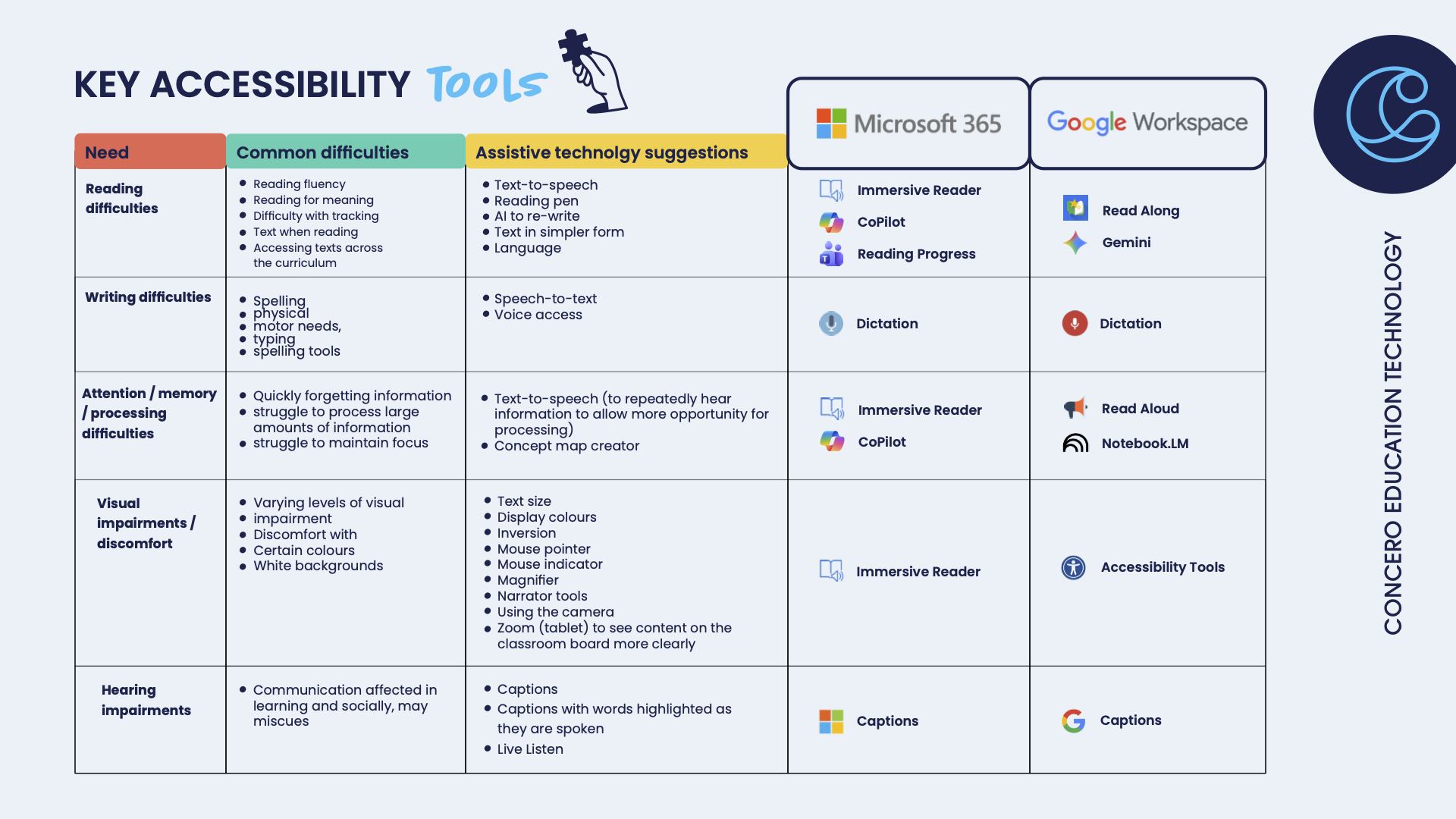
That’s why we’ve created a simple, shareable accessibility guide that maps:
- Common learning needs
- The tools that support them
- Where to find them in Microsoft 365 and Google Workspace
This guide can be shared across your school to align staff and support a consistent approach to inclusion.
ADD IN IMAGE
Download the accessibility guide and share it with your team
Use it in staff briefings, CPD sessions, or SEND reviews to support a more joined-up, inclusive approach across your school.
Building confidence and consistency
Having the tools is one thing; embedding them into everyday practice is another.
To truly support inclusive learning, staff need:
- Confidence in using the tools
- Clarity on when and why to use them
- Consistency across classrooms
Accessibility training to support inclusive practice
We offer practical accessibility training for schools, helping SENCOs, SLT, and teaching staff to:
- Adapt technology to support a wide range of individual needs.
- Use accessible features within Microsoft and Google platforms effectively.
- Improve engagement and productivity for both students and staff.
- Embed inclusive approaches into everyday teaching.
When accessibility is built into everyday practice, it creates a learning environment where everyone can take part, contribute, and succeed.
Why We Love Gemini (And Why Your School Might Too)
So, what is Gemini?
Gemini is Google’s AI-powered assistant, built into tools many schools are already using, like Google Workspace. Think of it as a highly capable digital assistant that can:
- Draft documents and emails
- Summarise reports and policies.
- Support planning and idea generation
- Help analyse information quickly.
But more importantly, it helps you and your team work smarter, not harder.
Safety, security and compliance – what SLT need to know
When it comes to AI in schools, the first questions are always the right ones:
Is it safe?
Where does the data go?
Are we compliant?
Here’s how Gemini addresses those concerns in a school context.
Built with Google Workspace security at its core
Gemini sits within Google Workspace, meaning it follows the same enterprise-grade security model many schools already rely on.
That includes:
- Data encryption in transit and at rest
- Robust access controls and user permissions
- Admin visibility through the Google Admin Console
For SLT, this means Gemini isn’t a standalone tool, it’s part of a controlled, managed environment.
Your data isn’t used to train the model
One of the biggest concerns around AI is data usage. With Gemini for Workspace:
- Your organisation’s data is not used to train Google’s foundation models.
- Prompts and outputs stay within your environment.
- Data handling aligns with Google Workspace’s existing privacy commitments.
This is a key distinction from many public AI tools.
Admin control and governance
IT leaders and SLT retain control over how Gemini is used across the school.
Through admin settings, you can:
- Enable or restrict access by user group.
- Manage who can use Gemini features.
- Apply existing safeguarding and acceptable use policies.
This allows you to introduce AI in a controlled and phased way, rather than opening it up all at once.
Supports safeguarding and responsible use
Gemini is designed with responsible AI principles in mind. That includes:
- Content filtering and safety guardrails
- Ongoing improvements to reduce harmful or inappropriate outputs
However, and this is important, AI should always be used alongside clear staff guidance and safeguarding awareness. Many schools are now:
- Updating their AI policies
- Providing staff training on appropriate use
- Setting expectations around reviewing AI-generated content
Aligned with UK GDPR and education standards
Google Workspace (and therefore Gemini within it) is designed to support compliance with:
- UK GDPR
- Data protection requirements in education
As with any tool, schools remain responsible for how it is used but Gemini fits within an existing, compliant ecosystem that many schools already trust.
The bottom line for SLT
Gemini is all about introducing capability within a secure framework you already manage. With the right controls, policies, and training in place, it can be adopted safely and responsibly across your school.
Why SLT teams are paying attention
1. It gives you time back (where it matters most)
One of the biggest pressures on SLT is time or more accurately, the lack of it. Gemini can take on the “heavy lifting” of first drafts, summaries, and admin tasks. For example:
- Turning meeting notes into clear action plans
- Drafting parent communications in seconds
- Summarising long policies or reports into key points
That means less time starting from scratch… and more time focusing on people, strategy, and impact.
2. It supports better, faster decision-making
School leaders are constantly processing information – reports, data, safeguarding updates, staff feedback. Gemini helps by:
- Breaking down complex information into clear summaries
- Highlighting key risks or priorities
- Helping you sense-check plans or approaches
It doesn’t replace professional judgement, but it does give you a clearer starting point, faster.
3. It helps staff feel supported (not stretched)
It’s not just about SLT – it’s about your whole team. Gemini can help teachers and support staff with:
- Lesson planning ideas
- Differentiation support
- Drafting reports or communications
When staff feel less overwhelmed by admin, they have more energy for teaching and supporting pupils. And that has a direct impact on outcomes.
4. It improves consistency across your school
Consistency is one of the hardest things to achieve at scale. Gemini can help standardise:
- Communication tone and clarity
- Policy summaries
- Reporting structures
This is especially valuable across MATs or growing schools where alignment matters.
5. It’s already where you work
For schools using Google Workspace, Gemini integrates into tools you already know like Docs, Gmail, and Slides. That means:
- No steep learning curve
- No new platforms to manage
- Immediate, practical use
It fits into your existing workflows, rather than adding to them.
What does this look like in practice?
Here are a few simple ways SLT teams are starting to use Gemini:
- Drafting a whole-school communication in minutes, then refining the tone
- Summarising Ofsted frameworks or guidance into key takeaways
- Creating staff briefing notes from longer documents
- Generating ideas for school improvement priorities
- Turning bullet points into structured policies
Small wins, but they add up quickly.
A word of caution (and confidence)
Like any tool, Gemini works best when used thoughtfully.
It’s not about replacing expertise, it’s about enhancing it.
SLT oversight, professional judgement, and safeguarding awareness remain essential.
But when used well, Gemini becomes a powerful support tool, one that helps you move faster, with more clarity and less pressure.
Why we love Gemini
We love Gemini because it’s practical. It doesn’t promise to transform everything overnight but it does make everyday tasks easier, quicker, and more manageable.
And in a school environment, that matters. Because when you save time on admin… you create more time for people.
Questions to take back to your school
If you’re starting to explore AI, these are useful questions for SLT discussions:
- How confident are our staff in using AI tools safely and effectively?
- Do we have a clear AI or acceptable use policy that reflects current technology?
- Where could AI reduce workload without compromising quality?
- How are we ensuring outputs are reviewed and used responsibly?
- What training or support would staff need to feel confident?
- How are we communicating AI use to parents and governors?
These aren’t barriers, they’re starting points.
Embracing AI in education (practically, not perfectly)
AI isn’t going anywhere. The question isn’t if schools will use it, it’s how.
The schools seeing the most value aren’t trying to do everything at once. They’re:
- Starting small
- Setting clear expectations
- Supporting staff with training
- Building confidence over time
That’s where tools like Gemini come into their own, not as a big transformation project, but as something that can be introduced gradually, with real, day-to-day impact.
How we can support your school
If you’re curious about how Gemini could support your school, start small:
- Try it for drafting your next communication
- Use it to summarise a long document
- Explore how it could support your staff
The value becomes clear very quickly.
Final thought
School leadership will always be complex. But the tools you use can make a real difference.
Gemini isn’t about doing more, it’s about doing what matters, better.
If you’d like to explore how Gemini could work in your school environment, we’re always happy to have a conversation.

At Concero Education Technology, everything we do is rooted in people. Schools, staff, students and the communities that surround them. So when we find an opportunity to extend that impact beyond the classroom, it matters.
We’re proud to share that Concero is now supporting Edukid, a charity helping children who face barriers to education access school, essential resources and ongoing support.
Why Edukid?
Edukid is a charity that works to remove barriers to education for children living in poverty. Through sponsorship, they provide essentials like school fees, uniforms, and learning materials, things that many of us take for granted, but which can make all the difference.
For us, the alignment felt immediate.
As an organisation that was founded in education, by people working in schools, we understand just how transformative access to education can be. It’s not just about learning, it’s about opportunity, confidence, and future possibilities.
What This Partnership Means
This initiative is about creating meaningful, tangible impact. Through our partnership with Edukid, we’ll be:
- Supporting children directly through sponsorship
- Raising awareness across our network of schools and partners
- Creating opportunities for our team and customers to get involved
It’s important to us that this doesn’t feel distant or abstract. We want this to be something our community can connect with. Something real, human, and ongoing.
Our Goal: A Classroom in Peru
Through this partnership, we’re working towards sponsoring a full classroom of 30 children in Peru for a year.
To make that happen, we’re aiming to raise £11,000, fully funding the class for 12 months and giving those children consistent access to education and support.
Living Our Mission
We support schools and businesses every day, delivering secure, reliable and accessible technology that empowers teachers to teach, leaders to lead, and people to thrive.
Supporting access to education in this way is a natural extension of that mission.
It’s about taking what we believe in and applying it more widely, beyond infrastructure, beyond systems, and into real lives.
Get Involved
We’ve set up a fundraising page if you’d like to support, share, or learn more:
https://www.justgiving.com/page/concero-classroom
We’ll also be running additional fundraising initiatives throughout the year, and we’d love for you to be part of it.
Keep an eye out for updates, stories, and ways to get involved. Because education should be accessible to every child.
And together, we can help make that happen.

AI is no longer a future consideration for schools. It’s already shaping how pupils learn, communicate and interact online. Alongside the opportunities this brings, school and trust leaders are navigating a growing set of safeguarding, wellbeing and compliance challenges.
This Safer Internet Day, Concero Education and Smoothwall are hosting a practical, senior-leader-focused webinar designed to help schools feel confident they’re keeping children safe in the age of AI.
This one-hour online session looks beyond the technology itself and focuses on the real-world impact schools can make through informed leadership decisions, strong digital foundations and early intervention.
Why this session matters now
Digital risk is evolving quickly. AI tools, online platforms and always-on connectivity are changing pupils’ digital lives, often faster than policies and systems can keep up. For leaders, safeguarding can no longer sit in isolation from digital strategy.
This webinar is designed to help school and trust leaders:
- Better understand what’s actually happening in students’ digital lives
- Spot early signs when a child may need support, enabling faster, more effective responses
- Put the right digital foundations in place to protect their community while safely embracing AI
- Feel confident about meeting future expectations, including the DfE Digital & Technology Standards and the 2030 deadline
What will be covered
The session opens with a short welcome on why safeguarding, wellbeing and digital strategy must now work together, especially in the context of Safer Internet Day and emerging AI risks.
You’ll then hear from Gabi Walshaw, VP of Product for Early Detection and Intervention at Smoothwall, who will explore how schools can better detect risk from spotting signs of AI misuse to identifying vulnerable pupils earlier, with the right balance of expert moderation and human oversight.
Next, Matthew Setchell, CTO at Concero Education, will focus on protection: why broadband, filtering and monitoring are critical safeguarding enablers, where common gaps leave schools exposed, and how leaders can make future-ready decisions without adding unnecessary complexity or cost.
Who should attend?
This session is ideal for Primary, Secondary and Independent schools, as well as MAT leaders, with responsibility for safeguarding, wellbeing or digital strategy.
The webinar is deliberately non-technical, practical and grounded in leadership priorities, no IT jargon, just clarity, reassurance and actionable insight.
🗓 12 February | 3:30–4:30pm (Online)
👉 Register to join the webinar and build confidence in your school’s approach to AI and digital safety.
We’re incredibly proud to share that Concero Education Technology has won the BETT Award 2026 for IT Support Service. Being recognised on a global stage by our peers in education technology is a huge moment for us, and one that reflects the people, trust and impact behind everything we do.
This award recognises not just what we deliver, but how we support schools, with care, consistency and a deep understanding of education.
Award-winning IT support for schools
Concero Education Technology provides IT support and services designed specifically for schools, multi-academy trusts and education settings.
Our approach goes beyond fixing issues. We work in partnership with schools to deliver secure, reliable and forward-thinking IT support that enables teaching, learning and leadership both day to day and long term.
Winning the BETT Global Award for IT Support & Services reflects the trust schools place in us and the impact of education-first IT support built around real needs, not one-size-fits-all solutions.
Built in schools. For schools.
Concero was founded in schools, by people who believed that IT should support people.
What started as technicians working side by side with teachers and school leaders has grown into a connected team supporting hundreds of schools across the UK. But while we’ve grown, the core of who we are hasn’t changed.
At Concero:
- It’s about people
- It’s about trust
- It’s about impact
- It’s about leaving things better than we found them. Always.
That people-first mindset continues to shape everything we do — from responsive helpdesk support to long-term digital strategy.
IT support today takes a whole team
Once upon a time, IT support might have meant a single technician fixing a printer or rebooting a PC. Today, technology runs through everything in a school – safeguarding systems, cloud access, Wi-Fi, communications, teaching tools and data protection.
Schools don’t just need one person anymore. They need a whole IT support team.
At Concero, that team includes education-focused engineers, strategists, cyber security specialists, trainers, procurement experts and project leads all working together to keep schools running smoothly and safely.
Seeing that collective effort recognised with a BETT Global Award and watching the news ripple back through the wider team felt incredibly special.
A message from our Founder
As our Founders, James Morris and Bradley Clegg:
James Morris shared:
“I’m proud of our team not just for what they do, but for how they do it. I’m grateful to our partners who stand behind this work, to the schools and educators who trusted us. And it really does mean a lot to be recognised by our peers in the industry. This award reflects the trust and impact behind our work. It tells us that the people we serve felt supported, heard and helped, and it encourages us to keep doing what we do.”
Bradley Clegg shared:
“This recognition means a huge amount to us. Concero Education Technology was founded by headteachers, built in schools, and shaped every day by the real challenges faced across education. Winning this award reflects the dedication of our brilliant team, who work tirelessly to deliver secure, reliable, and forward-thinking IT support that genuinely enables teaching, learning, and leadership.
Thank you to our schools, trusts, partners, and our incredible team for trusting us and supporting us on this journey. We’re hugely proud of how far we’ve come and even more excited about what’s next.
Finally, congratulations to all the finalists and winners at the BETT Awards it’s inspiring to be part of a sector full of innovation, collaboration, and genuine impact in education.”
Recognition that belongs to the whole Concero community
This award doesn’t belong to one person, it belongs to the entire Concero community.
- Our team, who navigate constant change with expertise, care and collaboration.
- Our schools and trusts, who trust us with their technology and their people.
- And our partners, who share our values and stand alongside us.
Looking ahead
Winning the BETT Award 2026 for IT Support Service is a proud milestone but it’s not the destination.
We’ll keep doing what we’ve always done:
supporting schools, championing change makers, and delivering award-winning IT support for education that puts people first.
Thank you to everyone who’s been part of the journey – past, present and future 💙



Cybersecurity in schools is often framed as an IT issue. In reality, keeping a school safe, secure and compliant relies on everyday habits shared across the whole school community.
That’s why we talk about Digital Hygiene.
It’s a simple way to describe the routines, protections and support that quietly reduce risk without adding pressure or workload.
Digital hygiene starts with everyday habits.
Just like personal hygiene, there’s no single routine that works for everyone, but the basics are essential.
Digital Hygiene is about finding a routine that fits your school.
The everyday habits that keep systems secure, data protected and learning uninterrupted.
Good Digital Hygiene is:
- Routine. – Ongoing care, not one-off fixes
- Prevention-first. – Reducing risk before incidents happen
- Practical – Designed for real schools with real constraints
- Shared. – Not just an IT responsibility
- Supported. Tools and people working together
The questions school leaders should be asking.
Strong Digital Hygiene often starts with a few practical checks:
- Are passwords secure and managed properly?
- Do staff receive regular cyber awareness training?
- Are devices kept up to date?
- Is user access reviewed and removed when it should be?
- Are backups in place — and tested?
- Is activity monitored and are incidents reported early?
- Is ownership clear and support available when needed?
These everyday routines support progress towards the DfE Cyber Security expectations for 2030, as set out in the Digital and Technology Standards.
If any of these feel hard to evidence or manage consistently, that’s exactly where a joined-up Digital Hygiene approach can help.
Turning good habits into action
Our Digital Hygiene Kit brings together the essential tools and support schools need – thoughtfully chosen, aligned to DfE Standards, and designed to reduce risk with minimal effort and maximum impact.
It’s about getting the right basics in place, consistently.
Let’s build better digital hygiene in schools.
Exploring the Digital Hygiene Kit is a great starting point. But understanding what will genuinely add value to your school takes a conversation.
We act as a critical friend, listening first, asking the right questions, and offering honest guidance based on real experience in schools.
We’re on a mission to help schools stay safe, secure and compliant, without adding pressure or workload.
AI tools like Microsoft Copilot and Google Gemini are no longer on the horizon — they’re already here.
Teachers are using them to plan lessons faster. Leaders are exploring how they might reduce admin pressure. And schools everywhere are asking the same question:
Are Copilot and Gemini actually GDPR compliant?
The honest answer is: they can be — but only if they’re set up and used properly.
Let’s take the noise out of it and look at what schools really need to know.
Why This Question Matters
Schools don’t have the luxury of “move fast and fix later”.
You’re responsible for:
- Pupil data
- Staff data
- Safeguarding
- Compliance
So when AI tools arrive promising speed and efficiency, it’s right to pause and ask whether they fit safely into your existing responsibilities.
This isn’t about stopping innovation.
It’s about using it confidently and responsibly.
The Reassuring Bit: The Platforms Themselves
When used through their education environments, both Copilot and Gemini are built with GDPR in mind.
Microsoft Copilot
Used within Microsoft 365 for Education, Copilot:
- Operates inside your school’s tenant
- Doesn’t use your data to train public AI models
- Respects existing permissions and access controls
- Aligns with Microsoft’s GDPR and UK data protection commitments
Google Gemini
Used through Google Workspace for Education, Gemini:
- Keeps data within your school’s managed environment
- Doesn’t train consumer AI models on education data
- Works alongside Google’s existing security and privacy controls
So at a platform level, the foundations are solid.
The risk doesn’t usually come from the tools themselves — it comes from how they’re used.
Where GDPR Risks Can Creep In
Most GDPR issues around AI aren’t technical. They’re human.
Common problem areas include:
- Staff pasting personal or sensitive information into prompts
- AI tools being accessed outside approved school accounts
- A lack of clarity around what is and isn’t appropriate use
- Policies that haven’t kept pace with new technology
AI doesn’t remove accountability.
It shifts it.
And without guidance, people will fill the gaps themselves — often with good intentions, but inconsistent results.
What “Good” Looks Like in Schools
Schools that use AI safely and confidently tend to have a few things in common.
1. Clear expectations
Staff know:
- What data should never be entered into AI tools
- Which accounts and platforms are approved
- When AI is helpful — and when it isn’t appropriate
2. Sensible policies (not scary ones)
This isn’t about banning tools or over-policing staff.
It’s about setting clear, practical boundaries that people can actually follow.
3. The right technical setup
That means:
- Proper account management
- Device controls
- Access aligned to roles
- Oversight without micromanagement
4. Ongoing conversations
AI isn’t a one-off decision.
The best schools review, adapt, and keep staff informed as tools evolve.
What This Means for Teachers
When AI is used well:
- Planning takes less time
- Admin pressure eases
- Creativity has more room to breathe
When it’s unclear or risky:
- Confidence drops
- Staff worry about “doing the wrong thing”
- Tools get avoided or misused
Good guidance doesn’t slow teachers down.
It gives them confidence to use AI properly.
What This Means for School Leaders
For leaders, AI governance is quickly becoming part of everyday responsibility — alongside safeguarding, data protection, and digital strategy.
Handled well, Copilot and Gemini can:
- Support staff wellbeing
- Reduce workload pressures
- Align with GDPR and inspection expectations
Handled poorly, they can introduce uncertainty and risk.
The difference is rarely the technology.
It’s the setup, clarity, and support around it.
The Bottom Line
Copilot and Gemini can be GDPR compliant in schools.
But compliance doesn’t happen by accident.
It comes from:
- The right configuration
- Clear expectations
- Confident, informed staff
- Ongoing support
Get those pieces right, and AI becomes what it should be — a tool that frees up time, not a source of worry. And if you’re not sure where your school currently sits, that’s okay. Most schools are figuring this out right now.
You don’t have to do it alone.